The Mission File Is Usually the Problem. MissionRX Can FIX It in Seconds.
When a DCS server stutters every couple of minutes, drops players in the middle of a sortie, or falls over entirely, everybody blames the box it runs on. More cores. More memory. A different host. We hear it every week.
Then we open the mission file, and the mission file turns out to be the problem. Around 65 percent of the DCS server crashes we investigate come from the mission's own scripts rather than the hardware underneath them.
That is not a dig at mission builders. DCS scripting is unforgiving in ways that nothing warns you about. The sim runs every line of your mission Lua on one thread, the same thread that moves aircraft and resolves weapons. Whatever you ask that thread to do, it does while the entire server waits. A loop that places two hundred vehicles looks perfectly reasonable in the editor and stops the world for a second and a half in the air.
MissionRX exists so that you find that before your players do.
What MissionRX Actually Does
Upload a .miz, a .lua or a .zip and you get a rating back in seconds. It is free, and there is nothing to install.
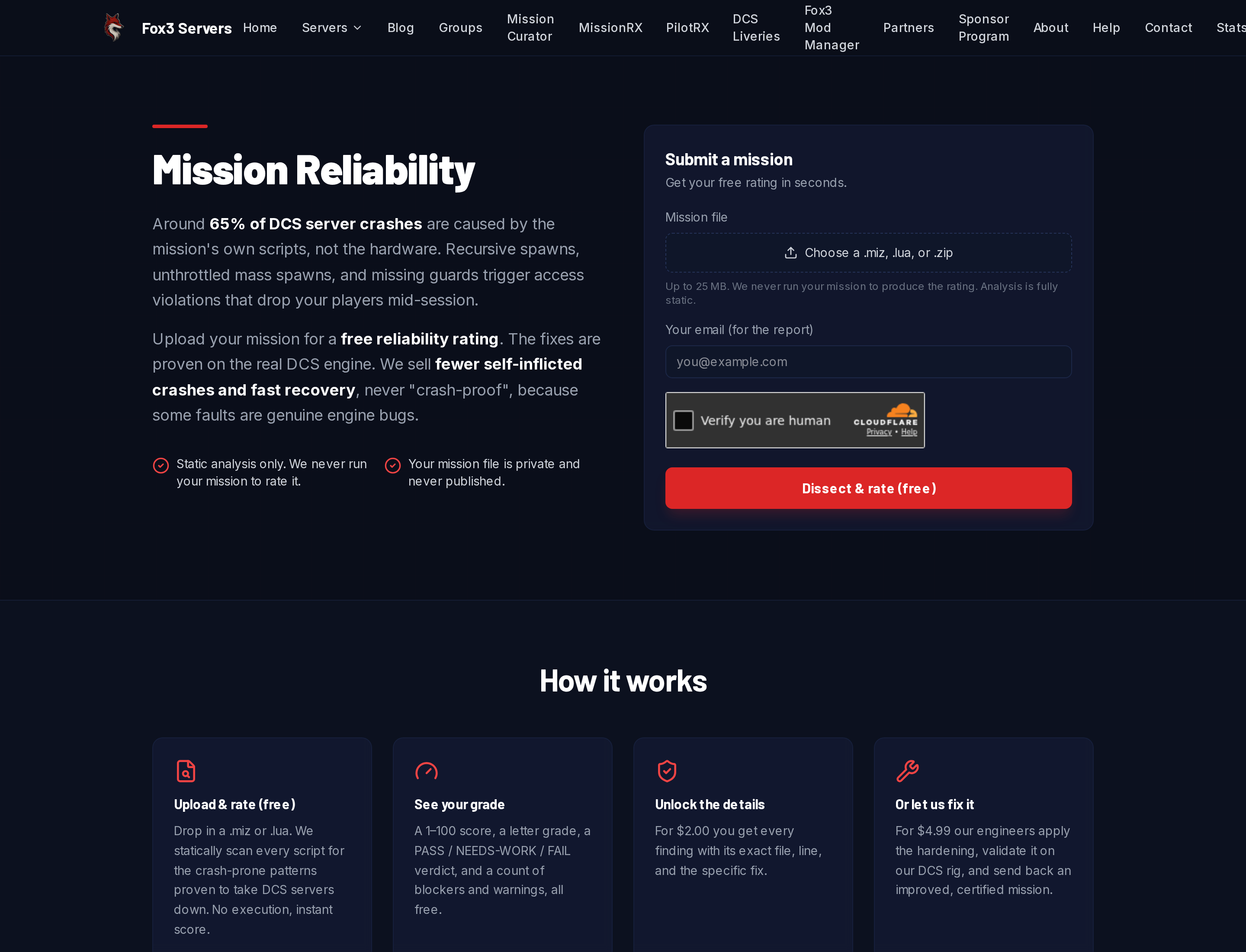
We never run your mission to rate it. A .miz is a zip archive, so we open it, pull out the mission table and every script it carries, and read the code statically. Nothing executes, nothing phones home, and your file is never published.
What comes back is a score from 1 to 100, a letter grade, a verdict, and a count of blockers and warnings. All of that is free. Here is the summary card from a mission we built specifically for this article, a Caucasus ground war with a dynamic AI spawner:
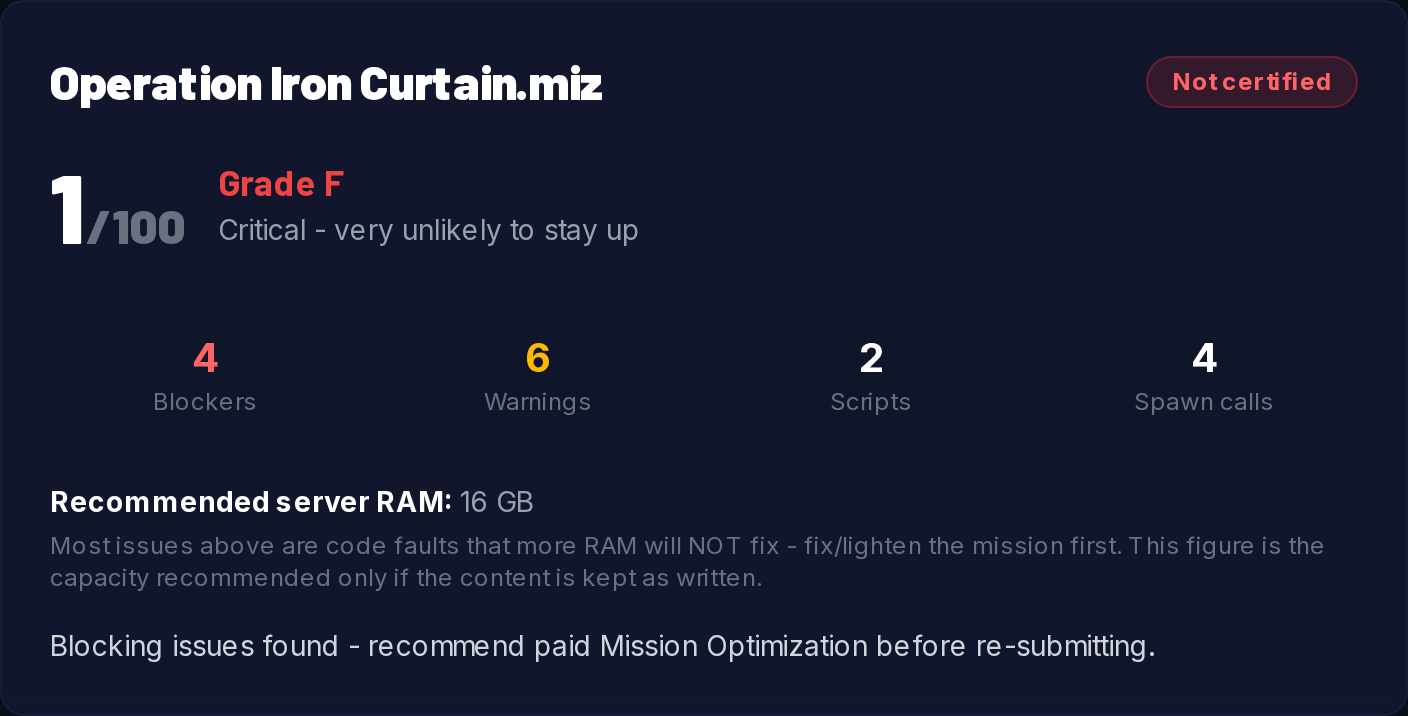
One detail there matters more than the grade. The recommended memory figure comes with a warning that most of the issues above it are code faults that more memory will not fix. We would rather tell you that upfront than sell you a larger server that crashes on the same schedule.
The other thing worth knowing is what we do not grade. Nearly every serious DCS mission bundles a community framework such as MOOSE, MIST or CTLD. Those libraries legitimately do things our crash rules flag, and you did not write them. So we exclude them from your score entirely. Your grade reflects your code, not somebody else's.
Example One: The Framework You Did Not Know You Shipped
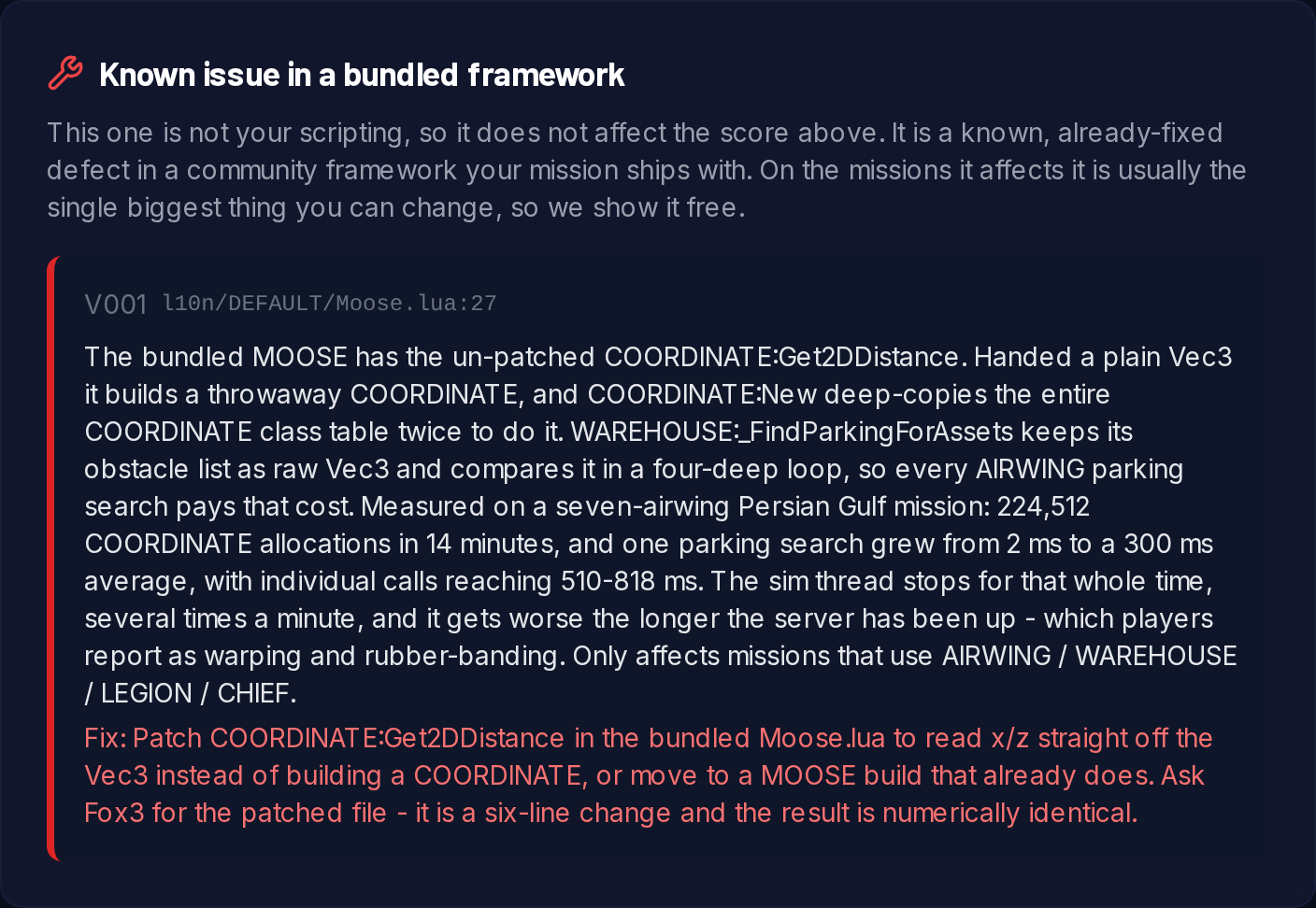
Excluding a framework from your grade is not the same as ignoring it. When we know about a specific, already fixed defect inside a bundled library, we report it, we never count it against your score, and we show it to you for free.
The first one we shipped came out of a real customer investigation. A squadron reported that their mission ran fine on the builder's machine and lagged badly on the server, getting worse the longer the server stayed up. Their scripting was fine. The bundled copy of MOOSE was not.
The function in question measures the distance between two points while ignoring altitude. Handed a plain coordinate table rather than a full framework object, the older builds quietly construct a throwaway object to do the comparison, and constructing one deep copies the entire class table twice. That would be a footnote, except that the parking search used by the AIRWING and WAREHOUSE systems keeps its obstacle list as plain tables and compares them four levels deep. Every parking search pays the whole bill.
What we measured on the live mission: 224,512 object allocations in 14 minutes, and a single parking search that grew from 2 milliseconds to a 300 millisecond average, with individual calls reaching 510 to 818 milliseconds. The sim thread stops for all of it, several times a minute, and it gets worse the longer the server has been up. To players that reads as warping, stutter and shots that do not register.
The fix is six lines. The result is numerically identical.
Of the missions submitted to MissionRX so far, 27 carried that exact defect. That is better than one in five, all of them shipping a performance problem that nobody wrote and nobody could reasonably have found by reading their own code.
Example Two: Too Many Units in One Tick
The second pattern is the one that actually takes servers down, and it is the most common serious finding we see.
DCS gives your script the floor for as long as it wants. A spawner written as a plain loop places every group it is asked for before the sim gets another turn. Five zones at 24 groups each is 120 spawns in one tick, plus the air defense, plus whatever the campaign logic adds on top. In the editor it is instant. On a populated server it is a freeze, and if one of those objects is malformed it is an access violation that takes the process with it.
MissionRX flags four separate versions of that mistake, and our demonstration mission commits all of them:
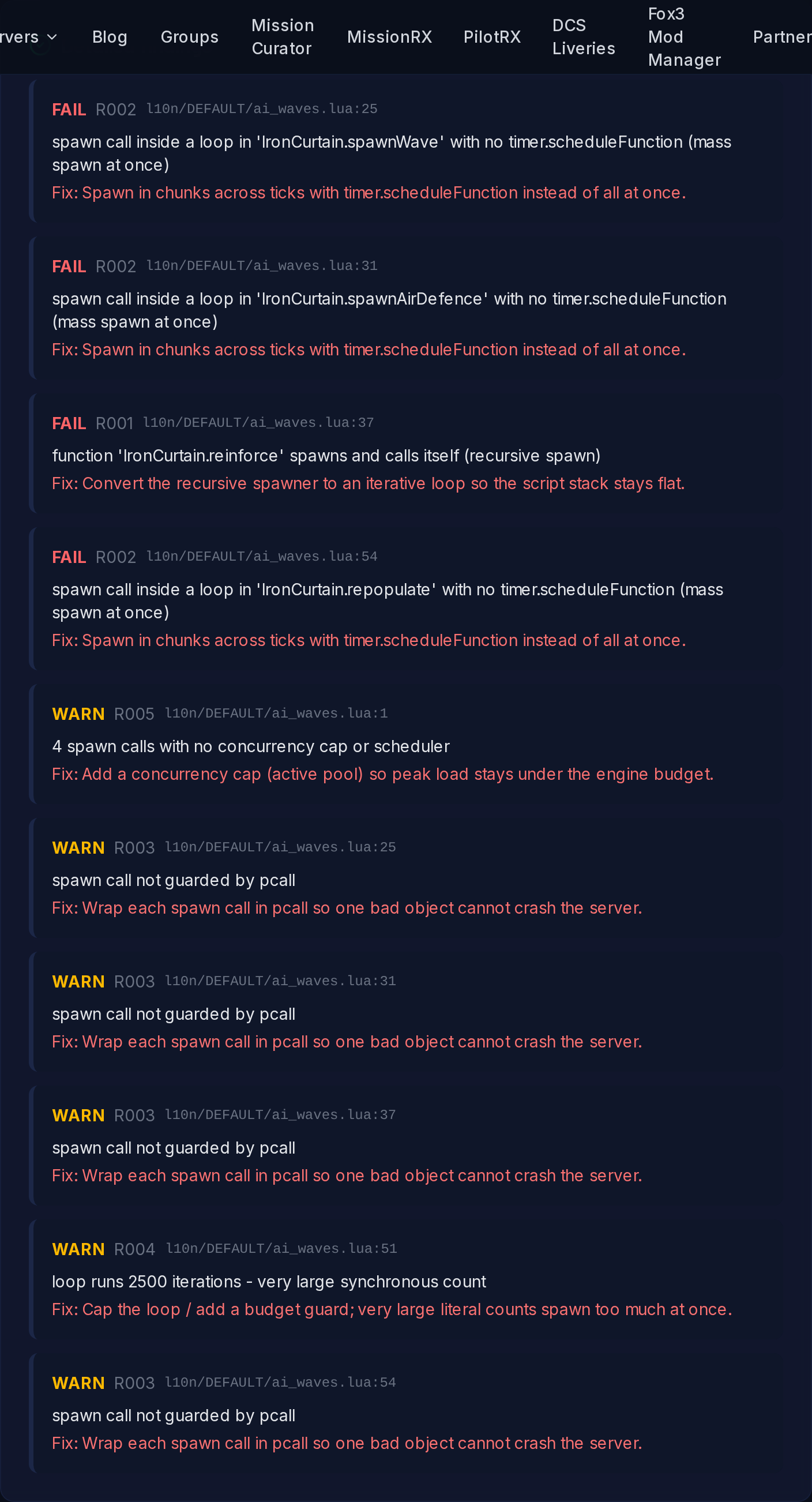
Read down that list and the shape of the problem is obvious:
- Mass spawn inside a loop with no scheduler. Three of them. Every group goes down in a single tick instead of being spread across several. The fix is to hand the loop to a timer and place a handful per tick.
- A recursive spawner. The reinforcement function calls itself once per wave, so the script stack grows with every reinforcement instead of staying flat. Rewritten as an iteration it costs nothing.
- A loop with a very large fixed bound. 2,500 iterations, all at once, with no budget guard.
- Spawn calls with no protective wrapper. One bad unit type and the whole mission script dies, or worse, the server does. Wrapping each call means one bad object gets skipped and logged instead of ending the session.
Every finding carries the file, the line number and the specific fix. Nothing is left as "consider optimizing your scripts."
Why This Makes a Mission Faster and Steadier
Three mechanisms do almost all of the work.
Spreading load across ticks. The engine does not care how much you spawn over a minute. It cares enormously how much you spawn in one frame. Chunked spawning turns a two second freeze into work that nobody notices.
Keeping the stack flat. Recursive spawners grow with the mission. They are fine in testing, when the campaign is young, and they are not fine four hours in.
Guarding the calls that touch the engine. A mission that survives its own bad data keeps running. A mission that does not takes everybody with it.
None of that removes content. We are not deleting your campaign to make a number look better.
A Real Server, Before and After
A customer came to us convinced our hardware had gone downhill. Heavy lag every two minutes, 60 to 90 seconds at a time, on what they described as a simple mission with four aircraft.
The mission carried 1,076 units, and it loaded MOOSE twice: two builds four and a half years apart, roughly 15 MB of framework, about 1.2 seconds apart in a single mission load. Two databases, two event dispatchers, two schedulers, every unit registered twice.
The obvious move is to delete the old copy. The obvious move would have broken them. A small training script in the mission depended on a class that modern MOOSE no longer ships, which is exactly why the old build was there. So we lifted that one class out of the 2021 build, checked every call it made against the current build, and loaded it on its own after a single modern MOOSE.
Measured on their live server afterwards: framework loads went from two to one, unit registrations from 2,118 to exactly 1,076, one core pinned at 100 percent to nothing above 15 percent, and the DCS memory commit from 16.51 GB down to 3.94 GB. The training script still works.
That is the part a scanner on its own cannot do, and it is what the paid tier buys you.
What We See Across Every Mission Submitted
Since MissionRX opened at the end of June we have rated 127 missions. The spread is worth publishing:
- 61 came back certified with nothing blocking them.
- 40 were certified with notes, meaning warnings worth fixing but nothing fatal.
- 24 were not certified, held up by at least one blocking fault.
- 63, very nearly half, had at least one unguarded spawn call. Across those missions we counted 1,261 individual unprotected calls.
- 24 had a mass spawn inside a loop with no scheduling.
- 12 had a spawner that called itself.
- 27 shipped a framework carrying a known performance defect.
Most missions are in reasonable shape. The ones that are not tend to be badly broken in one or two specific places, and those places take a machine seconds to find and a human hours, usually at two in the morning with players complaining.
What It Costs
The rating is free. Score, grade, verdict, blocker and warning counts, and any known framework defect. No account, no card.
The full report is $4.99. Every finding with its exact file, line number and the specific fix, so that you or your mission builder can do the work yourselves.
Improve and certify is $14.99. Our engineers apply the hardening, recursion turned into iteration, budget guards, chunked spawning and protected calls, validate the result on our own DCS rig, and send back an improved, certified mission.
We will not promise you a crash proof mission, and you should be suspicious of anyone who does. Some access violations are genuine engine faults that a mission merely triggers. For those we report the stack to Eagle Dynamics and help you lighten whatever is pulling the trigger, rather than charging you for a fix we cannot make. What we do sell is fewer avoidable crashes, and fast recovery when one happens anyway.
If your server has been misbehaving and you have quietly wondered whether it is you or us, spend the ninety seconds and find out. Upload your mission for a free rating, or read the MissionRX help page first if you want to know exactly what we look at. If you would rather have the whole thing handled, our managed DCS servers include the humans as well as the hardware, and you can always talk to us directly.
You fly. We handle the rest.
Ready to fly?
Get a fully managed DCS World or IL-2 server. Most customers are flying within an hour.