How to Tune Foothold Missions So Your DCS Server Stops Crashing at 2 AM
Three nights in a row. Same result every time. A 20 GB Fox3 server running Foothold Syria Extended hit the wall around peak hours, the dcs.log filled up with ALERT EDCORE Out of memory in ed_malloc, memory pinned at 98 percent, and the whole thing went down hard. No warning. No graceful exit. Just pilots getting booted mid sortie and a mission that would not come back clean until someone manually cycled it.
This is not a rare edge case. Foothold Syria Extended is one of the most popular persistent PvE frameworks in DCS right now, and for good reason. Dzsekeb's zoneCommander system is genuinely impressive: 76 capture zones, 364 AI group dispatchers, persistent campaign state that survives restarts, a full logistics layer with Mi-8 supply helicopters, and an F10 menu that lets players actually feel like they are shaping the war. It is a fantastic mission. It is also a mission that will eat every byte of RAM your server has if you let it run unchecked.
Here is exactly how we diagnosed the problem, what we changed, and how you can apply the same fixes to your own server without touching a single piece of gameplay.
What the Logs Are Actually Telling You
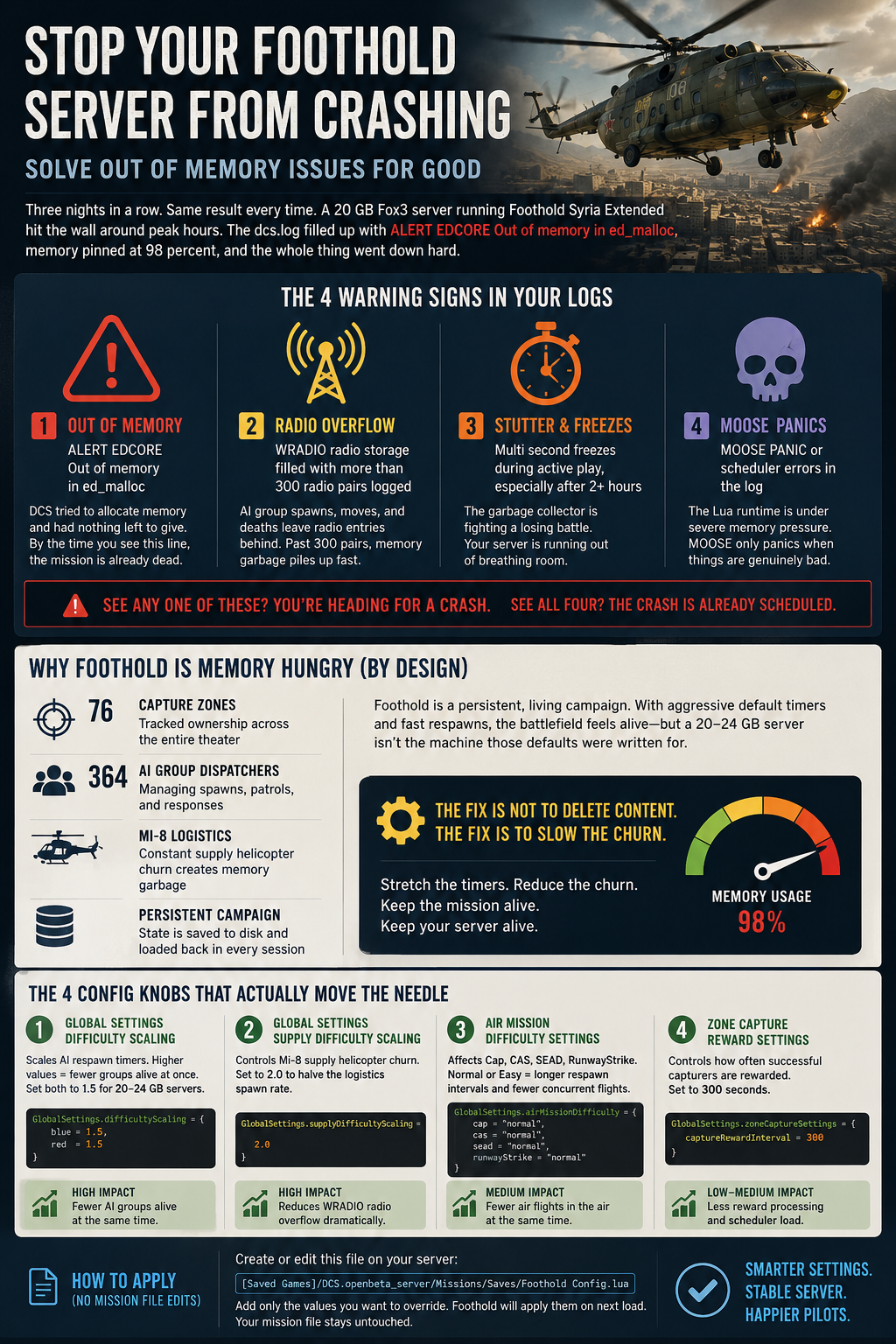
Before you change anything, pull your dcs.log from the server's Saved Games folder and look for these four warning signs. Any one of them means you are heading for a crash. All four together mean the crash is already scheduled.
1. The obvious one: ALERT EDCORE Out of memory in ed_malloc
This is DCS telling you it tried to allocate memory and there was nothing left to give. By the time you see this line, the mission is already dead.
2. The radio system overflow: WRADIO radio storage filled with more than 300 radio pairs logged
Foothold uses MOOSE's radio menu system extensively. Every AI group that spawns, moves, and dies leaves radio entries behind. When that number climbs past 300 pairs, you are watching accumulated memory garbage pile up in real time.
3. The stutter signature: Multi second freezes during active play, especially after the campaign has been running for two or more hours. This is the garbage collector fighting a losing battle.
4. MOOSE panic messages: Any MOOSE PANIC or scheduler error lines in the log mean the Lua runtime is under severe memory pressure. MOOSE is not fragile software; it only panics when things are genuinely bad.
In the Foothold Syria Extended case above, we saw all four. The mission had been running long enough that the saved campaign state itself was carrying a significant memory footprint into each new session, meaning the server started every night already partway down the hole.
Why Foothold Is Memory Hungry by Design
This is worth understanding before you start turning knobs, because it changes how you think about the fix.
Foothold is a persistent, living campaign. That is the whole point. The zoneCommander system tracks ownership across 76 zones, manages resupply convoys, spawns defensive and offensive AI groups dynamically, and logs all of it to disk so nothing resets when the server restarts. The Mi-8 supply helicopter layer alone can generate a constant churn of spawned, active, and despawned groups, each leaving a small memory trace behind.
With 364 AI group dispatchers running simultaneously, the mission is not spawning 364 groups at once. It is managing 364 potential spawners, some active, some waiting, all consuming scheduler slots. At default settings tuned for a large, well resourced server, the spawner activity is aggressive. Timers are short. Respawns are fast. The battlefield feels alive, and it is, but a 20 to 24 GB server is not the machine those defaults were written for.
The fix is not to delete content. The fix is to slow the churn.
The Four Config Knobs That Actually Move the Needle
Foothold reads its configuration from Foothold Config.lua inside the mission file at l10n/DEFAULT. If you are a server admin running a mission you did not build, you do not have to crack open the miz at all. Foothold also reads an external override file at:
[Saved Games]/DCS.openbeta_server/Missions/Saves/Foothold Config.lua
Create that file, add only the values you want to override, and Foothold will apply them on next load. Your customer's mission file stays untouched.
Here are the four settings with the highest impact, in order of how much they matter.
1. GlobalSettings.difficultyScaling
This multiplier scales the AI respawn timers for each coalition. The default is something close to 0.9 for blue and 1.1 for red, meaning blue AI respawns faster than red. Raising both values stretches the time between spawns, which directly reduces the number of active AI groups alive at any moment.
For a 20 to 24 GB server under load, move both values to 1.5:
GlobalSettings.difficultyScaling = { blue = 1.5, red = 1.5 }
This does not remove any AI. It just means fewer groups are simultaneously alive and consuming scheduler slots. Players will not notice the difference in moment to moment gameplay. They will notice the server is still running at midnight.
2. GlobalSettings.supplyDifficultyScaling
This is the one most people miss. The Mi-8 supply helicopter layer runs on its own dispatcher system, and at default settings it generates a constant stream of spawned, en route, landed, and despawned helicopters. Each cycle leaves radio entries behind. This is the primary driver of the WRADIO overflow problem.
Set this to 2.0:
GlobalSettings.supplyDifficultyScaling = 2.0
That halves the supply helicopter churn rate. Logistics still works. Zones still get resupplied. The Mi-8 swarm just operates on a slower cadence, and your radio storage count stops climbing toward 300.
3. Air Mission Difficulty Settings (Cap, CAS, SEAD, RunwayStrike)
Foothold lets you set difficulty levels per air mission type. Hard difficulty means shorter respawn intervals and more concurrent flights. On a large server with plenty of headroom, hard settings make the airwar feel intense. On a 20 GB server running a mature campaign with persistent state already loaded, hard red air settings are the difference between a stable session and a 2 AM crash.
For any coalition air mission type currently set to hard, bring it to medium:
RedSettings.capDifficulty = "medium"
RedSettings.casDifficulty = "medium"
RedSettings.seadDifficulty = "medium"
RedSettings.runwayStrikeDifficulty = "medium"
Medium is not easy. The red air threat is still real. But it caps the number of concurrent enemy flights in a way that keeps memory growth linear instead of exponential during a three hour full lobby session.
4. AutoRestart = true
This one is the simplest and it matters more than people expect. When a Foothold campaign completes, all the objectives are captured by one side and the campaign resets. If AutoRestart is false, the mission just sits in a post campaign state, doing nothing useful but still holding every byte of memory it accumulated during the campaign.
Set it to true:
GlobalSettings.AutoRestart = true
When the campaign ends, the mission restarts. DCS flushes the memory state. The next campaign begins fresh. This is especially valuable for servers that run overnight or across multiple play sessions, because it creates a natural memory reset point without requiring admin intervention.
The Persistent State Problem
Here is something worth calling out specifically for long running servers. Foothold saves campaign state to the Saves folder between sessions. That is the feature that makes it great: pilots come back the next night and the war is exactly where they left it.
The side effect is that a campaign that has been running for a week starts each session carrying all that accumulated state into memory. Zone ownership records, group kill logs, supply histories, all of it loads on mission start. A server that had 4 GB of headroom on day one might have 1.5 GB of headroom by day seven running the same mission with the same settings.
If your tuned mission is still trending toward crashes after two or three weeks of continuous campaign play, that is probably why. The honest options at that point are a RAM upgrade in 4 GB steps, or a deliberate campaign state reset by clearing the Saves folder and starting a fresh campaign.
Neither option is a failure. They are just the natural lifecycle of a persistent campaign server.
The Real World Result
After applying the four config changes above and adding some additional virtual memory headroom on the host, the same Foothold Syria Extended mission that had crashed three nights in a row loaded clean and ran a full evening session with several gigabytes of headroom to spare. Same 76 zones. Same 364 dispatchers. Same full lobby. The pilots never knew anything changed, which is exactly how a good tune up should feel.
The battlefield was still dangerous. The Mi-8s still flew resupply. Red SEAD packages still came at you. The campaign still progressed. It just did not crash.
One More Tool Worth Knowing About
If you want a faster way to audit a mission before it hits your server, the Fox3 MissionRX tool at fox3servers.com/mission-reliability will grade any uploaded mission file, flag unthrottled spawn loops, and recommend an appropriate RAM size for stable operation. It takes about two minutes and it has saved more than a few servers from a preventable bad night.
For Fox3 hosted customers, the team applies these tune ups directly. You do not have to touch config files or dig through logs yourself. That is part of what managed means.
But whether you are on Fox3 or running your own iron, these four config lines are where you start. Slow the churn. Keep the fun. Keep the server running.
Blue skies and stable servers.
Two Fox3 Tools That Do the Heavy Lifting
Everything in this guide can be done by hand, but Fox3 also ships two tools that cover both ends of the problem.
Fox3 Mission Curator builds complete DCS missions to order. Pick a map, an era, and a scenario, and the engine assembles a mission that is sized sensibly for a dedicated server from the start, with armed AI, valid parking, and QA validation baked into every build. If your group is fighting a mission that was never designed for multiplayer server loads, generating a purpose built replacement is often faster than rescuing the old one. Find it at fox3servers.com/products/mission-curator.
Fox3 MissionRX works the other direction. Upload any existing mission at fox3servers.com/mission-reliability and it grades the mission's scripts, flags unthrottled spawn loops and recursive spawn patterns like the ones described above, and recommends the right RAM size for the server it will run on. The Foothold mission from the case study in this post graded an F on its first MissionRX report, which told us exactly where to look. MissionRX subscribers also get optimization and live load test certification handled by the Fox3 team.
Generate missions that fit your server with Mission Curator, and use MissionRX to diagnose and tune the ones you already love.
Frequently Asked Questions
Q: Will these Foothold config changes make the mission easier or less fun?
A: Not in any way most players will notice. Raising difficultyScaling from 0.9/1.1 to 1.5/1.5 just means AI groups take slightly longer to respawn after they are killed or despawn. The number of active zones, the F10 menu, the logistics system, and all the capture mechanics stay exactly the same. The battlefield is still contested. It just has fewer simultaneously active groups at any given moment, which is precisely what your server needs.
Q: Do I have to edit the .miz file to apply these settings?
A: No. Foothold reads an external override file at [Saved Games]/DCS.openbeta_server/Missions/Saves/Foothold Config.lua. Create that file with only the values you want to change and Foothold will apply them on next mission load. The original .miz file stays untouched, which is important if you are running a mission built by someone else.
Q: How do I know if my Foothold server is heading toward a crash before it actually crashes?
A: Check your dcs.log for WRADIO radio storage entries climbing past 300 pairs, MOOSE PANIC or scheduler error messages, and any ALERT EDCORE memory lines. During play, multi second stutters that get progressively worse over a session are also a reliable early warning. If you see any of those, apply the tuning steps above before the next session.
Q: My server has 32 GB of RAM. Do I still need to tune Foothold?
A: Default settings are more manageable on larger servers, but Foothold Syria Extended can still fill 32 GB on a long campaign run, especially with persistent state accumulated over multiple days. The AutoRestart setting and supplyDifficultyScaling adjustment are still worth applying regardless of server size. Think of them as insurance.
Q: When should I reset the Foothold campaign save state?
A: If you have applied all four config changes and your server is still trending toward memory exhaustion after extended campaign play, clearing the Saves folder and starting a fresh campaign is the cleanest fix. Foothold campaigns do have a natural end state anyway. Finishing one and starting fresh is not a workaround; it is the intended lifecycle. Pair it with a RAM upgrade if full lobby sessions are regularly pushing past four hours.
Ready to fly?
Get a fully managed DCS World or IL-2 server. Most customers are flying within an hour.